Listing Monitor User Guide
CoinWings Listing Monitor is one of the core exclusive features for CoinWings Pro users. It tracks spot and futures listing announcements from major cryptocurrency exchanges in real time. This helps users stay informed the moment a mainstream platform lists a new token. When new coins launch on exchanges like Binance or Coinbase, prices often experience extreme volatility — making this tool invaluable for new token enthusiasts.I. Listing Monitor Feature OverviewThe Listing Monitor tracks the latest listing announcements across major exchanges in real time. Upon release of an official listing notice, our AI model parses the details, organizes the information, and instantly pushes it to users via App notification or email.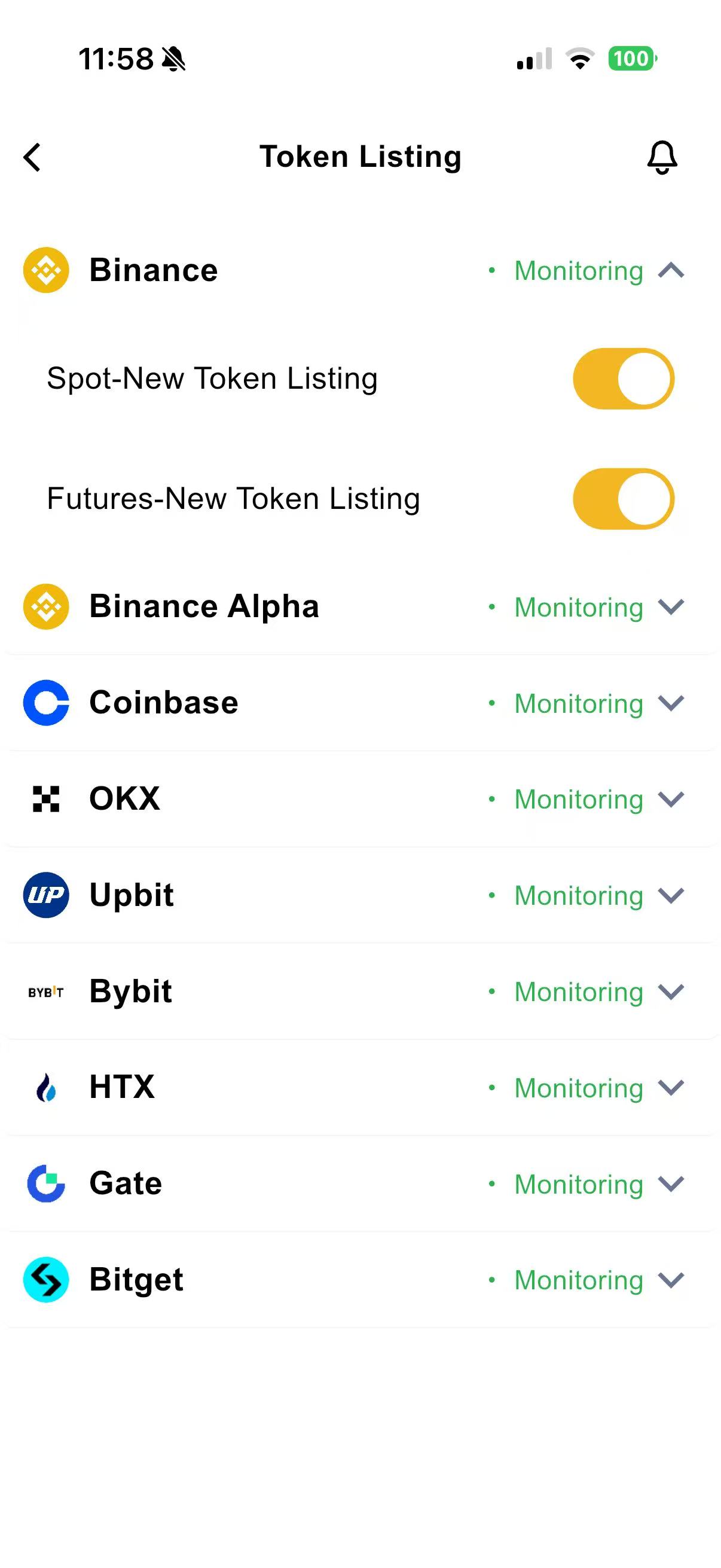
Supported Exchanges:
- Binance: Spot, Futures, Alpha
- Coinbase: Spot
- OKX: Spot, Futures
- Upbit: Spot
- Bybit: Spot, Futures
- HTX: Spot, Futures
- Gate: Spot, Futures
- Bitget: Spot, Futures
Note: This feature is exclusive to Pro users. Non-Pro users cannot enable it. Due to evolving anti-scraping measures by exchanges, there may occasionally be delays or missed notifications. We will gradually expand support to additional mainstream exchanges in the future.
II. Detailed Explanation of Listing MonitorThe supported exchange list is displayed below. Tap an exchange to expand Spot and Futures toggle switches. Enabling the Spot switch activates spot listing alerts. Tap the notification bell in the top-right to select delivery method: App Push or Email.1. How to Enable Listing Monitor?As shown in the example:
Tap Binance → expand toggle options → enable both Spot - New Listing and Futures - New Listing.
This activates monitoring for Binance Spot new listings and Binance Futures new listings. When Binance announces a new spot or futures pair, the system will automatically send a notification.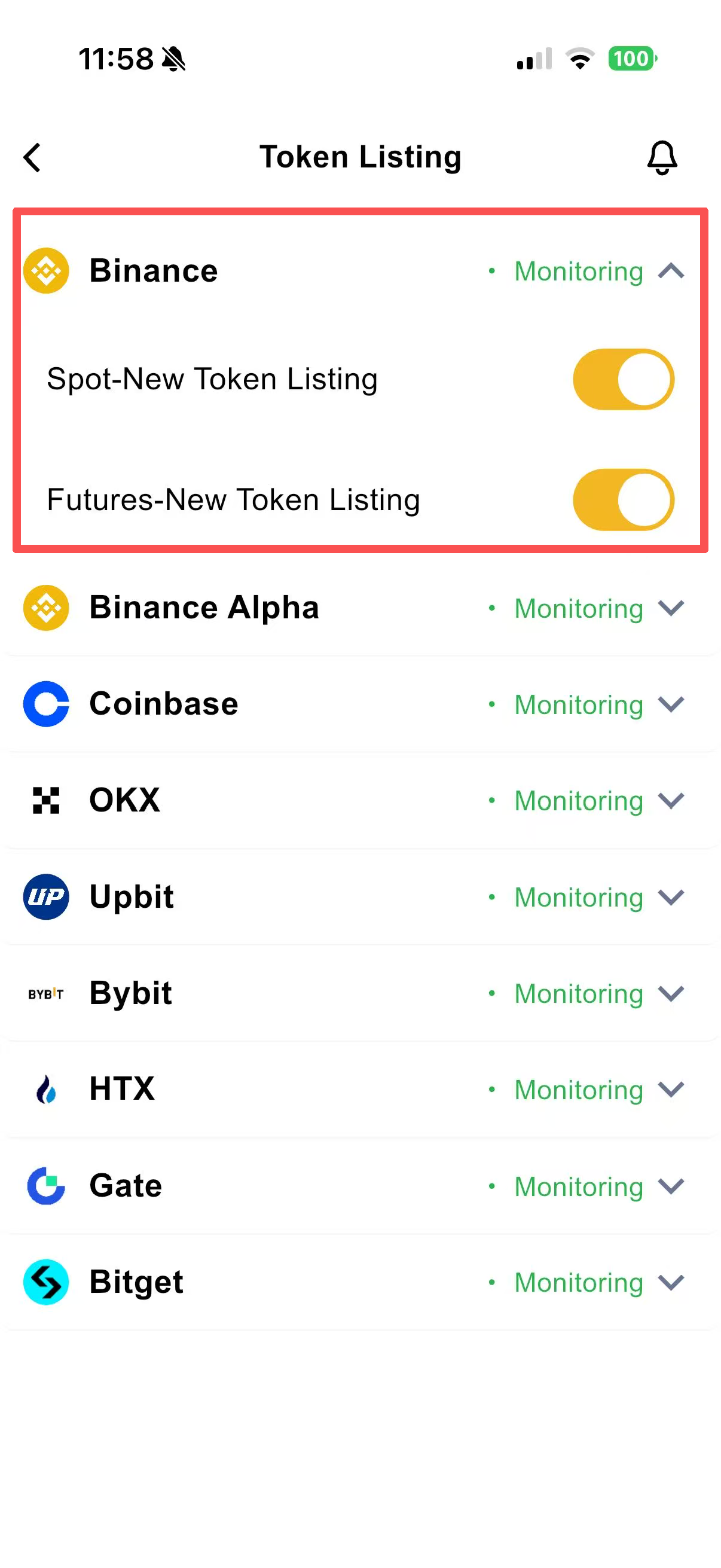
Tap Binance → expand toggle options → enable both Spot - New Listing and Futures - New Listing.
This activates monitoring for Binance Spot new listings and Binance Futures new listings. When Binance announces a new spot or futures pair, the system will automatically send a notification.
2. How Long Is the Delay Between Announcement and Notification?Exchanges often post announcements after internal creation, and each platform has unique announcement formats, templates, and anti-crawling systems. Processing times vary.
Historical data shows: Most alerts are sent within 5 seconds to 1 minute after public announcement.3. What Is the Purpose of Listing Monitor?Certain new tokens experience significant volatility shortly after being listed on Binance, Coinbase, etc. — affecting both spot and derivatives markets.
Upon receiving a listing alert, users can evaluate the token’s fundamentals to decide whether to buy, sell, or take other trading actions.III. Risk DisclosureThe CoinWings Listing Monitor tracks public listing announcements, trading start times, listing categories, and related market dynamics from major exchanges. It aims to provide timely information reference only. Please note the following risks:
Historical data shows: Most alerts are sent within 5 seconds to 1 minute after public announcement.3. What Is the Purpose of Listing Monitor?Certain new tokens experience significant volatility shortly after being listed on Binance, Coinbase, etc. — affecting both spot and derivatives markets.
Upon receiving a listing alert, users can evaluate the token’s fundamentals to decide whether to buy, sell, or take other trading actions.III. Risk DisclosureThe CoinWings Listing Monitor tracks public listing announcements, trading start times, listing categories, and related market dynamics from major exchanges. It aims to provide timely information reference only. Please note the following risks:
- Information Only — Not Investment Advice
Listings often trigger extreme volatility, including rapid pumps and dumps. CoinWings does not endorse any token’s performance. Users must independently assess and bear all trading risks. - Listing ≠ Reliability or Long-Term Value
Even on top-tier exchanges, listed projects may include:- Hype-driven narratives / high-risk ventures
- Projects without mature products
- Future large unlocks or selling pressure
A listing does not mean “safe” or “guaranteed gains.”
- Abnormal Price Action Around Listing
Including but not limited to:- Instant spikes or crashes at open
- Massive buy rushes causing extreme slippage
- Bots front-running and distorting price
Exercise strict risk control. Avoid FOMO.
- Timing & Information Asymmetry
- Announcement times vary across exchanges
- Actual trading may be slightly delayed due to system or technical reasons
CoinWings aggregates from public sources — delays may occur. Always verify with the official exchange announcement.
- All Trading Decisions Are User Responsibility
Cryptocurrency markets are highly volatile. A listing does not guarantee profits or stability. Assess your risk tolerance carefully.
This concludes the basic tutorial for using CoinWings Listing Monitor.
If you have any questions, please contact us via official email or in-app feedback.
CoinWings Team
coinwings.io
CoinWings Team
coinwings.io
Related Articles
CoinWings AI Signal User Guide
CoinWings is an AI-driven cryptocurrency trading signal monitoring tool. Its AI signal system monitors on-chain activities, smart algorithms, and whale/smart money behaviors to help you capture market opportunities in real time. This tutorial will ...Heatmap User Guide
CoinWings Heatmap is designed to provide instant insight into the price performance, market structure, and short-term capital flows across the entire cryptocurrency market. Through color, size, and sorting, you can grasp overall market heat, trending ...What is Pump.fun?
? What is Pump.fun? Pump.fun is a decentralized MEME coin launch and trading platform built on the Solana blockchain. With its extremely low entry barrier and highly community-driven nature, it has recently become a trending tool in the crypto ...What is AMM?
? What is AMM? AMM (Automated Market Maker) is the core trading mechanism used by decentralized exchanges (DEXs). Instead of relying on a traditional order book, AMMs use “liquidity pools” to automatically match trades and determine prices. In other ...Is there any token or NFT reward after purchasing CoinWings Pro?
? Thank You for Choosing CoinWings Pro! CoinWings Pro is a premium subscription service launched by CoinWings, designed to provide users with higher-quality crypto data, broader feature access, and an enhanced user experience. As a Pro user, you’ll ...