CoinWings AI Signal User Guide
CoinWings is an AI-driven cryptocurrency trading signal monitoring tool. Its AI signal system monitors on-chain activities, smart algorithms, and whale/smart money behaviors to help you capture market opportunities in real time. This tutorial will guide you through the full process of viewing signals → filtering signals → setting up notifications to efficiently use CoinWings AI signals.I. Introduction to AI SignalsCoinWings AI signals are generated by monitoring the trading activities of smart money, whales, and KOLs, combined with AI algorithms that track their behaviors to produce real-time buy/sell signals. AI signals currently support four major blockchains: Solana, BSC, ETH, and Base. After downloading and entering the CoinWings App, tap the “AI” tab to access the AI signal interface.
Note: AI signals are currently exclusive to Pro users. After the trial period ends, only data from the past 2 hours will be visible.
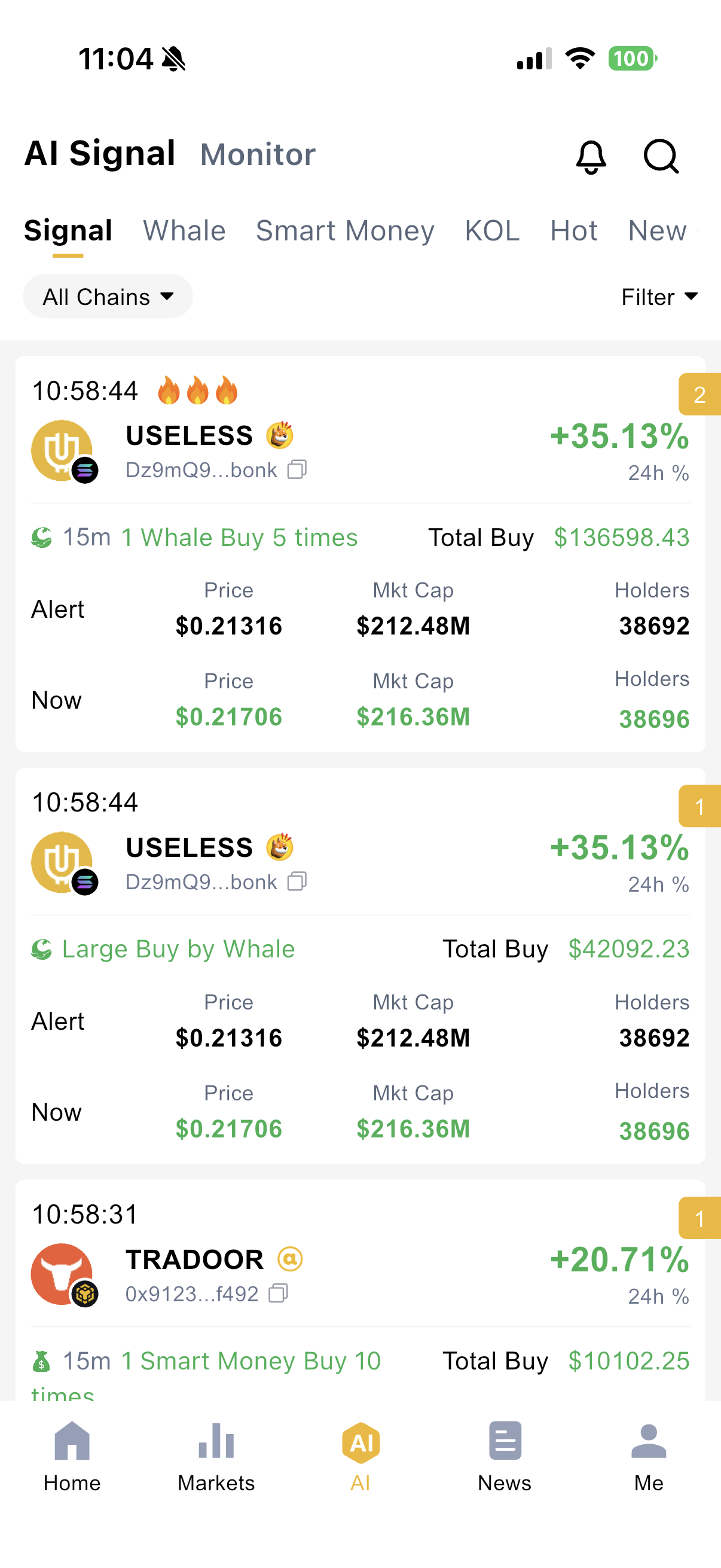
II. Signal Components ExplainedEach CoinWings AI signal consists of the following key elements, which help users assess opportunities quickly:
- Signal Time: The exact time when the signal was triggered for the token.
- Signal Strength: Divided into Normal, Important, and Urgent. Strength correlates positively with cumulative trading volume and frequency — higher volume or more frequent trades = stronger signal.
- Daily Signal Count: Number of times the token triggered a signal within a 24-hour period (based on UTC+0 00:00). Higher counts indicate greater trading activity and market heat, often leading to increased price volatility.
- Token: The cryptocurrency triggering the signal, identifiable via token logo, name, and contract address.
- Signal Type: Mainly categorized as:
- Whale Signal
- Smart Money Signal
- KOL Signal
Example: "1 whale bought 5 times in 15 mins" means the same whale executed 5 buy transactions within 15 minutes.
- Cumulative Buy/Sell Amount: Total transaction value in the current signal. Larger amounts = stronger signal.
- Current vs. Alert-Time Price/Market Cap: Allows intuitive comparison of price and market cap changes since the signal was issued.
III. Signal FilteringCoinWings AI supports multi-chain and multi-type filtering. Use the “All Chains” dropdown in the top-left to select your preferred chain (supports Solana, BSC, ETH, Base). Tap the filter button in the top-right to customize conditions.Available Filters:
- Buy Only / Sell Only: Filter by transaction direction.
- Signal Type: Choose from Whale, Smart Money, or KOL signals.
- First Alert Only: Show only the first daily signal per token.
- First Discovery: Tokens launched within the last 1 hour.
- New Tokens: Tokens launched within the last 24 hours.
- Signal Strength: Filter by Normal / Important / Urgent (e.g., selecting Urgent shows only urgent signals).
- Market Cap: Set a custom market cap range.
- Holder Count: Set a custom range for number of token holders.
IV. Signal NotificationsTap the bell icon in the top-right to access the AI Signal Notification settings (Pro users only). Once enabled, the system pushes real-time alerts based on your preferences.Customizable Settings:
- Signal type
- Signal strength
- Token type (new/first discovery)
- Buy/sell direction
- Other filter conditions
Notification Methods:
- App Push Notifications
- Email Alerts
Notification Frequency (to ensure quality & avoid spam):
Explained at the bottom of the notification settings page:
- Normal Signals:
Only for new tokens or first discoveries
→ Max 3 notifications per token per day - Important Signals:
Triggered by significant on-chain behavior
→ Max 3 notifications per token per day - Urgent Signals:
For major sudden events
→ First 5 signals: instant alerts
→ After 5: sent at intervals
→ Max 30 notifications per token per day
That concludes the basic tutorial for using CoinWings AI signals.
If you have any questions, please contact us via official email or in-app feedback.
If you have any questions, please contact us via official email or in-app feedback.
CoinWings Team
coinwings.io
coinwings.io
Related Articles
Listing Monitor User Guide
CoinWings Listing Monitor is one of the core exclusive features for CoinWings Pro users. It tracks spot and futures listing announcements from major cryptocurrency exchanges in real time. This helps users stay informed the moment a mainstream ...Heatmap User Guide
CoinWings Heatmap is designed to provide instant insight into the price performance, market structure, and short-term capital flows across the entire cryptocurrency market. Through color, size, and sorting, you can grasp overall market heat, trending ...AI Signals — Whale & Smart Money Transaction List
CoinWings AI Whale Signals track real-time on-chain transactions of whales and smart money addresses across popular tokens. Through this interface, you can view current whale and smart money activity across different blockchains. Whale trades often ...CoinWings AI Signals — KOL Trading List
The CoinWings AI KOL Trading List tracks global influential KOL trading addresses (including high-profile figures like CZ) by monitoring their real-time on-chain transactions to generate both the KOL transaction list and KOL signals. You can view the ...Is there any token or NFT reward after purchasing CoinWings Pro?
? Thank You for Choosing CoinWings Pro! CoinWings Pro is a premium subscription service launched by CoinWings, designed to provide users with higher-quality crypto data, broader feature access, and an enhanced user experience. As a Pro user, you’ll ...